Evlo - Keynote Template: Crafting a Cohesive Visual Narrative
You know the feeling: you’re preparing a big presentation, and the default slides feel like a beige wall—functional, maybe, but utterly forgettable. You need something that does more than just hold text; you need a framework that tells a story. That’s exactly where the Evlo - Keynote Template steps in. It’s not just a collection of slides; it’s a design system built to ensure your ideas land with the visual punch they deserve. Whether you’re pitching a startup, presenting a quarterly review, or showcasing a portfolio, having a cohesive and visually engaging experience is the difference between an audience that nods off and one that leans in.
A Foundation for Visual Consistency
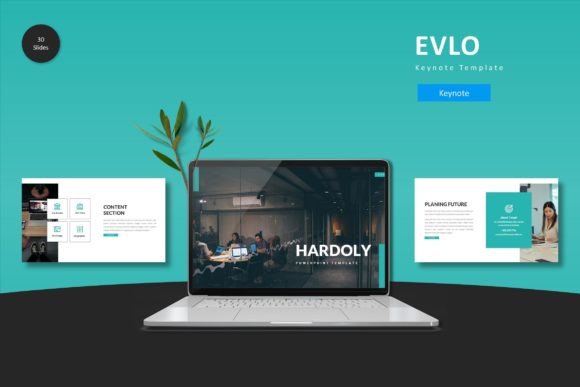
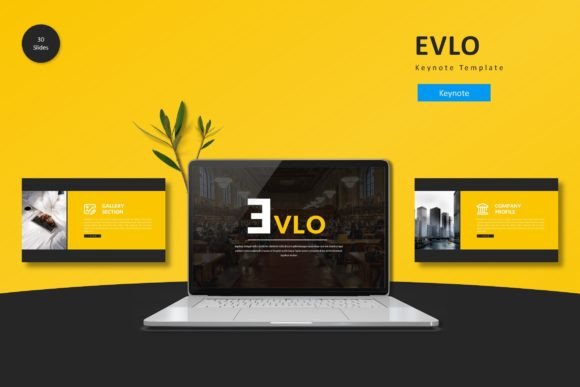
One of the biggest struggles in design—whether it's for a website, a social media campaign, or a keynote—is maintaining consistency. You start with a color palette, but by slide 15, you’ve drifted into random shades of blue that don’t quite match. Evlo solves this by offering 5 distinct color variations right out of the box. This isn't just about changing the background; it’s about providing a complete color story that works harmoniously across 30 unique slides per template.
This kind of structure is invaluable for brand identity. Imagine you’re a small business owner or a creative entrepreneur. You don’t have time to fiddle with hex codes for every single element. With Evlo, you pick the color scheme that best represents your brand's mood—be it bold and energetic or calm and professional—and the heavy lifting is already done. The pixel-perfect illustrations and handcrafted infographics are designed to scale without losing quality, ensuring your visuals look sharp on any screen, from a laptop to a massive projector.
Beyond the Slides: Practical Applications for Designers and Creators
While the primary function of Evlo is presentations, thinking of it solely as a "Keynote file" limits its potential. For designers and content creators, this template is a goldmine of design assets. The layouts included—specifically the gallery and portfolio slides—are structured in ways that can inspire editorial design and web design mockups.
Consider the graphic design workflow. You might be working on a client’s brand identity deck. Instead of building grids from scratch, you can utilize Evlo’s master slide structure to map out how their logo sits on different backgrounds or how their typography hierarchy works in a real-world context. The picture placeholder feature, which allows for simple drag-and-drop functionality, makes it incredibly easy to swap out stock photos for client assets, saving hours of tedious resizing. This efficiency is crucial when you are juggling multiple projects, from packaging design concepts to marketing assets.
Streamlining Your Workflow with Master Slides
If you’ve ever tried to update a font style across 50 slides manually, you know the pain. The Evlo - Keynote Template is built on Master Slides, a feature that is often underutilized by non-designers but is a lifesaver for professionals. This means that if you decide halfway through your presentation that the headers need to be a different weight or the spacing needs adjustment, you make that change once in the master view, and it cascades through the entire deck.
This level of control is essential for modern typography. Readability is king. You want to ensure that your font pairing choices—perhaps a bold display font for headers and a clean sans serif font for body copy—are applied consistently. Evlo’s structure supports this by providing clear areas for text hierarchy. It forces a discipline that actually helps the content shine. Instead of worrying about alignment issues, you can focus on the narrative flow of your speech.
Adapting to Various Creative Needs
The versatility of a good template lies in its adaptability. Evlo isn't just for corporate boardrooms. Its clean lines and handcrafted infographics make it suitable for a wide range of applications:
- Educational Workshops: Teachers and course creators can use the structured layouts to break down complex information into digestible chunks.
- Social Media Content: The individual slides can easily be exported as images for Instagram carousels or LinkedIn posts, providing high-quality social media graphics without needing to open Photoshop.
- Digital Lookbooks: Fashion designers or artists can leverage the gallery slides to create digital lookbooks or digital products that showcase their work in a polished format.
- Event Invitations: For those hosting webinars or workshops, the template can be adapted to create visually appealing digital invitations or promotional materials.
The ability to customize layouts, fonts, and colors effortlessly means you aren't locked into a specific "corporate" look. You can strip it back for a minimalist aesthetic or layer it up for something more dynamic. This flexibility is what separates a standard file from a premium design asset.
Choosing the Right Visual Language
When selecting a template like Evlo, it’s helpful to look at the specific visual characteristics it offers. The inclusion of section break slides is a subtle but powerful tool for pacing. In a long presentation, visual fatigue is real. These breaks act as mental palate cleansers, signaling to the audience that a new topic is beginning.
Furthermore, the fact that all graphics are resizable and editable cannot be overstated. In the world of commercial design, assets need to be flexible. You might need to pull an icon from the deck to use on a website or resize an infographic for a printed report. Because the vectors are editable, you aren't stuck with a static image; you have raw material to work with. This makes Evlo a practical investment for anyone who regularly creates marketing assets or print materials.
Final Thoughts on Presentation Design
Ultimately, a presentation is a visual aid, and its job is to support your message, not distract from it. The Evlo - Keynote Template provides the scaffolding for a professional presentation that feels intentional and curated. By handling the technical aspects of alignment, color theory, and typography hierarchy, it frees you up to be more creative with your content. Whether you are a brand strategist pitching a rebrand or a blogger sharing a travel itinerary, the goal is the same: to communicate clearly and leave a lasting impression. With the right tools, that goal becomes much more achievable. Remember to review the Readme First file included in the package to ensure you have the correct fonts installed for the best rendering of your modern typography