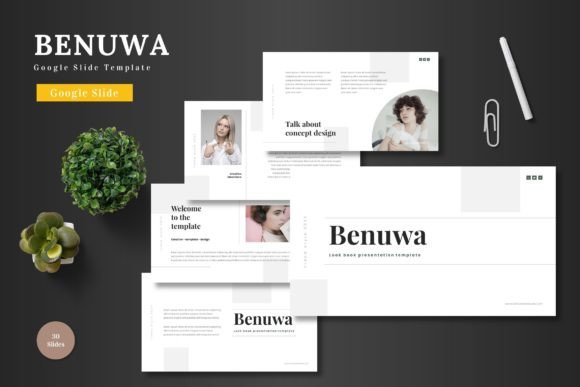
Benuwa: The Google Slides Template That Transforms Your Presentations
Picture this: you've got a brilliant business idea, a compelling pitch deck to assemble, or a product launch that needs visual impact. You open Google Slides, stare at the blank canvas, and suddenly the creative momentum stalls. The default templates feel overused, the layout options seem limited, and you're left wondering how to make your presentation stand out without spending hours on design work. This is exactly where Benuwa steps in—not as another generic template, but as a comprehensive design system built specifically for Google Slides users who demand professional quality without the complexity of traditional design software.
What makes this particular template collection worth your attention? The answer lies in its thoughtful approach to modern presentation design. With over 150 slides distributed across five distinct color schemes, Benuwa offers enough variety to handle virtually any business scenario you can imagine. Whether you're crafting a startup pitch deck for investors, designing an e-commerce product showcase, or building a corporate training module, the template adapts to your specific needs rather than forcing you to adapt to rigid design constraints.
Why Google Slides Templates Matter More Than You Think
Most professionals underestimate the power of visual consistency in presentations. When your slides look polished and cohesive, audiences automatically perceive your content as more credible and trustworthy. Research consistently shows that well-designed presentations significantly improve information retention and audience engagement. Yet many businesses and entrepreneurs settle for mediocre slide designs simply because creating custom presentations from scratch requires design skills they don't possess.
Benuwa solves this accessibility problem by bringing professional-grade design directly into Google Slides. Every element—shapes, icons, charts, text boxes, and image placeholders—lives within Google's native editing environment. There's no need to switch between applications, learn new software, or worry about compatibility issues. You simply open the template, click on any element you want to modify, and make your changes using tools you already know. This streamlined workflow means you can transform a generic template into a branded presentation in minutes rather than hours.
The practical implications extend beyond time savings. When your presentation workflow becomes frictionless, you're more likely to create presentations consistently. Instead of dreading the design process, you might actually look forward to building your next pitch deck or training module. That psychological shift alone can dramatically improve the quality and frequency of your business communications.
Breaking Down the Visual Design System
Five premade color variations might sound modest, but each scheme has been carefully calibrated to work across different industries and brand personalities. The color palettes range from bold and energetic combinations perfect for startups and creative agencies to sophisticated, muted tones that suit corporate environments and financial presentations. Rather than overwhelming you with dozens of mediocre color options, Benuwa focuses on five genuinely versatile schemes that you can further customize to match your exact brand colors.
The slide architecture deserves particular attention. Each of the 30 slides per template section serves a distinct purpose—data visualization slides for presenting metrics and statistics, team introduction layouts for humanizing your brand, product showcase slides for e-commerce applications, and timeline designs for project roadmaps. Section break slides provide natural pause points in your presentation, helping audiences absorb information before moving to the next topic. This structural variety means you're not recycling the same three layouts throughout your entire presentation, which creates visual fatigue and reduces engagement.
Pixel-perfect illustrations and handcrafted infographics elevate the template beyond basic slide layouts. These custom graphics communicate complex ideas visually, making your data more accessible and your concepts more memorable. All graphics are fully resizable and editable, so you can scale them appropriately for different presentation contexts—from large conference screens to intimate boardroom meetings to laptop-sized video calls.
Practical Applications Across Industries
Small business owners frequently struggle with presenting their products and services professionally, especially when competing against larger companies with dedicated design teams. Benuwa levels this playing field by providing presentation infrastructure that matches what established corporations use internally. A local bakery owner can create a catering proposal that looks as polished as a presentation from a national restaurant chain. A freelance consultant can deliver client reports that rival those produced by major consulting firms.
Entrepreneurs preparing investor pitches face unique challenges—they need to communicate complex business models clearly while projecting confidence and professionalism. The template's pitch deck slides address this specific need with layouts designed for financial projections, market analysis, competitive landscapes, and growth strategies. These aren't generic business slides; they're structured to guide investors through the information they expect to see, presented in the format they're accustomed to reviewing.
E-commerce businesses and product-based companies will find particular value in the gallery and portfolio slides. These layouts showcase products with clean, spacious designs that let merchandise speak for itself. The drag-and-drop image placeholders make it simple to swap product photos without disrupting the overall composition. Whether you're presenting a new product line to retail buyers or creating a lookbook for social media content, these visual-first layouts deliver the impact you need.
Content creators and marketers can leverage Benuwa for social media content creation, webinar presentations, and digital product development. The template's clean, modern aesthetic translates beautifully to screen recordings, video presentations, and downloadable resources. Many creators use Google Slides presentations as the foundation for online courses, workshop materials, and lead magnets—applications where visual quality directly impacts perceived value and conversion rates.
Maximizing Your Template Investment
Getting the most from any template requires understanding its capabilities and limitations. Start by exploring all 150+ slides before committing to a specific layout for your presentation. Often, the perfect slide for your needs exists in a section you might overlook initially. Spend fifteen minutes browsing through the complete collection, and you'll discover layouts that solve design challenges you hadn't even considered.
Customization should follow a strategic sequence. Begin by selecting your color scheme, then adjust the master slides to incorporate your brand colors, fonts, and logo placement. This top-down approach ensures consistency across your entire presentation and saves significant time compared to editing individual slides separately. Once your master slides reflect your brand identity, every new slide you create automatically inherits those design elements.
The readme file included with your download contains essential information about fonts and photos used in the template preview. Review this document carefully before starting your project. Understanding which fonts complement the template's design helps you maintain visual harmony when adding your own text content. If you prefer to use your brand's existing fonts, test them against the template's layouts to ensure readability and aesthetic compatibility.
Consider creating multiple versions of frequently used presentations—a detailed version for in-person meetings, a condensed version for email sharing, and a visually rich version for screen presentations. Benuwa's extensive slide library supports this multi-format approach without requiring you to build each version from scratch. Simply duplicate your presentation and rearrange slides to suit different communication contexts.
Moving Beyond Basic Presentations
The true value of a well-designed template extends far beyond individual presentations. It becomes a foundation for your entire visual communication strategy. When every presentation your company produces shares consistent design DNA—similar color palettes, aligned visual hierarchies, cohesive typography choices—your brand identity strengthens with each interaction. Clients begin recognizing your visual style before they even read your company name.
This consistency compounds over time. A startup that uses Benuwa for its first investor pitch, then its client onboarding presentations, then its annual reports, builds a visual language that stakeholders associate with professionalism and attention to detail. That association translates directly into business outcomes—higher client retention, stronger referral rates, and increased willingness among prospects to engage with your services.
The animated slides add another dimension to your presentations without requiring animation skills. Subtle transitions and motion effects guide audience attention, emphasize key points, and create a more engaging viewing experience. Use these animations judiciously—they should support your content rather than distract from it. A well-timed animation that reveals data points sequentially or highlights a critical statistic can dramatically improve information retention compared to static slides.
Your presentation is often the first substantial interaction stakeholders have with your brand. Make that interaction count by investing in design infrastructure that supports your communication goals rather than constraining them. With the right template as your foundation, you spend less time wrestling with design logistics and more time crafting the messages that move your business forward.