Creating Mouth-Watering Food Content: The Delicious Burger Template
In the competitive world of food blogging and restaurant marketing, a standard snapshot of a meal rarely cuts it anymore. To stop the endless scroll on social media, you need imagery that pops—something that conveys texture, temperature, and taste before the viewer even reads a caption. However, commissioning a professional photographer or a graphic designer for every single Instagram post isn't always feasible for small business owners or independent creators. This is where the value of high-quality design assets comes into play. We recently took a deep dive into the "Delicious Burger" template to see how it stands up against the rigorous demands of modern visual communication, specifically for those looking to elevate their food content without breaking the bank or spending hours in Photoshop.
Visual Appeal and Technical Specifications
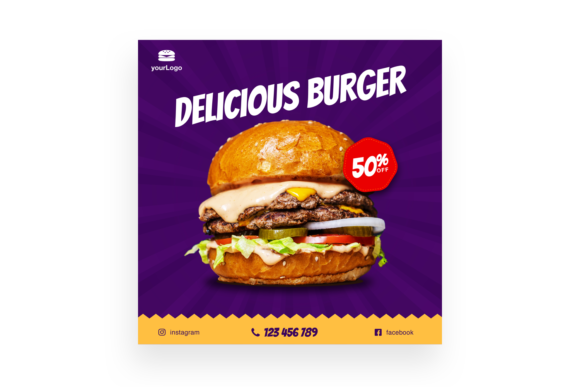
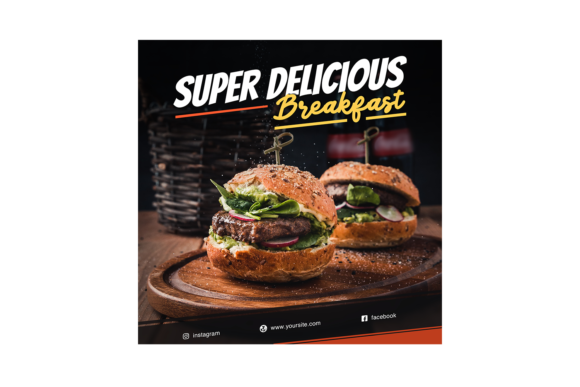
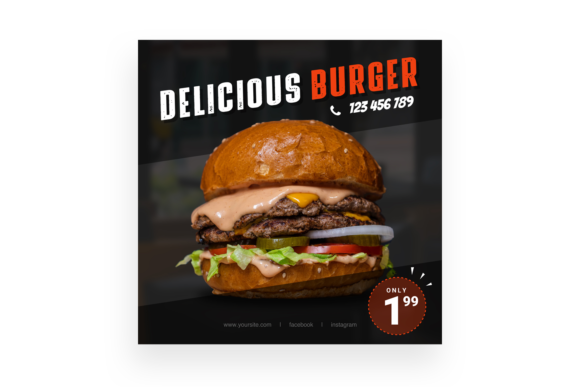
At its core, the "Delicious Burger" template is designed to mimic the high-end editorial look you see in major food magazines or on the feeds of fast-food giants. The visual composition focuses on a mouth-watering hero image that dominates the frame, utilizing warm tones and sharp contrasts to make the textures of the bun, lettuce, and patty stand out. It isn’t just a static image file; it is a fully engineered PSD file designed at a substantial 3000×3000 pixel resolution. This size is crucial because it ensures your final output is crisp on high-definition retina screens, and it also provides enough resolution should you decide to repurpose the graphic for print materials like flyers or posters.
One of the most significant technical hurdles with premium templates is often software compatibility. This asset is built for PSD CS4 or higher, which covers a vast majority of users, from those on older workstations to those running the latest Creative Cloud iterations. However, the true technical prowess lies in the Smart Object Replacement feature. For those unfamiliar, Smart Objects are layers that contain image data from raster or vector images, such as Photoshop or Illustrator files. In practical terms, this means you don’t need to be a masking expert to change the main photo. You simply double-click the layer, paste your own image of a burger (or any food item, for that matter), save, and the template automatically applies the correct distortion, lighting, and shadows to make your photo fit the scene perfectly.
Beyond the Burger: Versatility for Branding
While the name suggests a singular focus, the application of this design extends far beyond just selling hamburgers. The layout follows a classic hierarchy that works exceptionally well for social media graphics and marketing assets. The inclusion of Organised Layers means that every text box, background element, and color overlay is separated and named logically. This is a lifesaver for designers who need to maintain visual consistency across a campaign. You can easily adjust the color palette to match a client’s specific brand identity—perhaps swapping the warm browns for cool blues if you are adapting the layout for a different type of promotion entirely.
For small business owners, this template serves as a bridge between amateur content and professional presentation. Imagine you are launching a new menu item next week. Instead of just posting a photo, you can use this template to create a cohesive announcement that looks like it was produced by a big-budget agency. It works beautifully for:
- Packaging Design: Using the layout to mock up how the branding might look on a takeaway wrapper.
- Website Banners: Cropping the high-res file to fit a hero section on a landing page.
- Digital Products: Creating mockups for recipe e-books or cooking course promotions.
- Merchandise: Adapting the graphics for t-shirt prints or sticker designs.
Enhancing Audience Engagement and Readability
Typography is often the silent killer of good design. A beautiful image can be ruined by poor font choices or cluttered text placement. The "Delicious Burger" template addresses this by coming with a Read Me.txt file that includes a direct link to the font used in the preview. This is a critical detail that many asset creators overlook. By downloading the specific premium font intended for the design, you ensure that the kerning (spacing between letters) and leading (spacing between lines) remain exactly as the designer intended.
However, typography is also about readability. The template likely utilizes a display font for the headline to grab attention, balanced against a cleaner sans serif font or serif font for the smaller details. When you edit the text, pay attention to contrast. If your background image is busy, ensure your text overlays have enough opacity or drop shadows to remain legible. The goal is to improve audience engagement; if users have to squint to read your call-to-action, you’ve lost them. The editable nature of the file allows you to tweak these elements until the balance between imagery and information is perfect.
Practical Workflow: Saving Time and Resources
Time is the most expensive commodity for a content creator or entrepreneur. The primary value proposition of an asset like this is the reduction of production time. Because the layers are organised, the workflow is streamlined. You aren't hunting through a "Layer 1, Layer 2, Layer 3" mess. Instead, you will likely find folders labeled "Background," "Text," "Effects," and "Main Image." This structure allows for rapid iteration. You can create five different variations of a post in the time it would usually take to build one from scratch.
Furthermore, the easy to edit nature of the file makes it accessible to hobbyists who may not have advanced technical skills. If you are a food blogger who is great at cooking but struggles with complex Photoshop masking, the Smart Object functionality is your best friend. It democratizes design, allowing you to produce modern typography and layout trends without needing a degree in graphic design. It allows you to focus on your message—whether that’s a recipe, a sale, or a brand update—rather than getting bogged down in the technical weeds of file construction.
Strategic Implementation for Long-Term Success
When integrating this asset into your toolkit, think about the long game. Visual branding relies on recognition. When your audience sees a specific style of post repeatedly, they begin to associate that aesthetic with your brand. By using this template as a foundation, you can build a recognizable style for your Instagram grid or your blog headers.
Consider the versatility of the Smart Object for seasonal campaigns. You can keep the layout identical but swap the burger for a turkey sandwich in November or a fresh salad in January. This maintains brand recognition while keeping the content fresh. It’s also worth noting the utility of the included preview jpg file. This is useful for quick approvals if you are working in a team or for getting client sign-off before diving into the detailed editing process.
Ultimately, the "Delicious Burger" template is more than just a picture of food; it is a functional design system. It bridges the gap between high-end visual marketing and the practical needs of busy creators. Whether you are designing a poster for a local diner, creating a digital invite for a BBQ, or simply trying to make your blog look more polished, having a reliable, easy to edit, and technically sound asset in your library is an investment that pays dividends in time saved and quality gained.