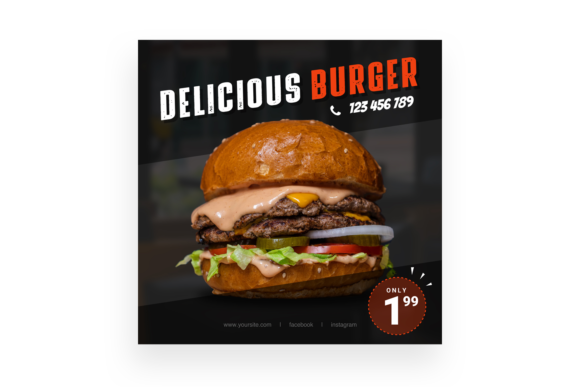
Delicious Burger 4: A Bold PSD Template for Food Branding
There’s a specific kind of visual language that makes people stop scrolling and start craving. For anyone in the food industry, capturing that "fresh off the grill" look isn't just about photography; it’s about the entire composition. Whether you are running a local bistro, managing a fast-food chain’s social presence, or designing packaging for a new condiment line, the assets you use define how appetizing your product appears. That is why having a robust design template like the Delicious Burger 4 is more than just a convenience—it is a strategic asset for your brand identity.
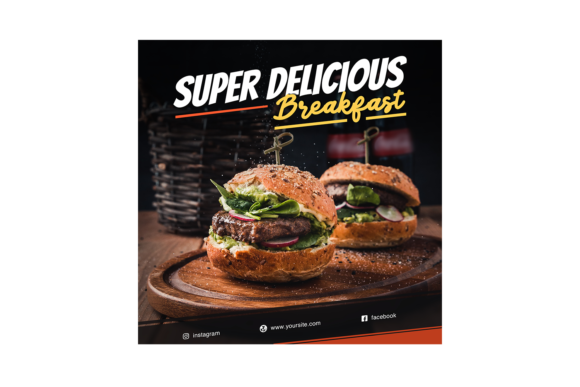
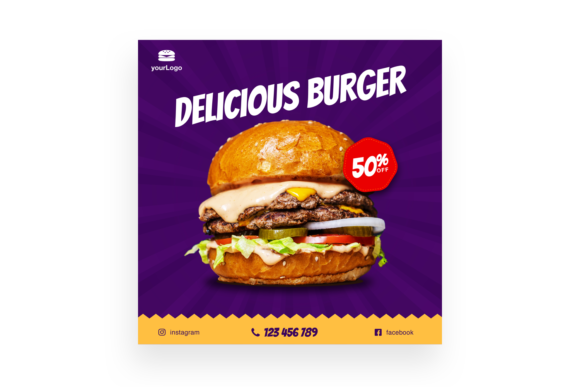
At its core, this resource is a high-end PSD template designed specifically for Instagram, but its utility stretches far beyond a single social media post. It is built for the modern creative who needs professional results without spending hours tweaking pixels from scratch. The file comes in at a crisp 3000x3000 pixels with 300dpi resolution, ensuring that whether you are viewing it on a retina display or sending it to a local printer for a menu insert, the quality remains impeccable.
Streamlining Your Workflow with Smart Objects
One of the biggest hurdles in design is the gap between a concept and a finished product. We have all been there: you have a great idea for a promotional post, but the technical execution drags on for hours. This template eliminates that friction through the use of Smart Object Replacement. For those unfamiliar, a Smart Object is a layer in Photoshop that preserves an image's source content with all its original characteristics, enabling non-destructive editing.
What this means for you practically is that you don’t need to be a Photoshop wizard to use the Delicious Burger 4 template effectively. You simply double-click the layer, drop in your own high-quality food photography, save it, and the template automatically applies the lighting, perspective, and effects to make your image fit seamlessly into the design. This is particularly vital for small business owners who need to rotate their menu items or seasonal specials quickly. If you are a marketing manager preparing for a weekend burger special, you can have a professional-grade post ready in minutes rather than outsourcing it to an agency and waiting days for revisions.
Versatility Across Marketing Channels
While the name suggests a focus on Instagram, the 3000x3000 pixel canvas is a versatile square format that works across almost all digital and print mediums. In the world of social media graphics, consistency is king. You want your aesthetic to be recognizable whether a customer sees you on Facebook, Pinterest, or a digital billboard. Because this file is organized with labeled layers, it is incredibly easy to modify elements to fit different contexts without losing the integrity of the original design.
Consider the applications for a food truck owner. You could use the base design for your Instagram story, but then adapt the layout for a physical flyer to hand out at a local fair. The high DPI (dots per inch) ensures that the text and graphical elements remain sharp when printed. Similarly, if you are a blogger focusing on food reviews or recipe development, using a cohesive template like this helps establish a professional editorial style. It tells your audience that you care about the presentation of your content, which builds trust and authority.
The Importance of Organized Layers
A common frustration with downloaded design assets is opening a PSD file only to find a chaotic mess of layers labeled "Layer 1," "Layer 2," and "Copy of Copy." This makes customization a nightmare. The Delicious Burger 4 template prides itself on Organised Layers. This structure allows you to easily isolate specific elements—such as the background, the main subject, typography overlays, and lighting effects.
This level of organization is crucial for maintaining visual consistency across a campaign. If you decide that your brand colors have shifted slightly, or you want to adjust the contrast of the burger image without affecting the text, organized layers allow you to do this non-destructively. It gives you granular control over the final output, ensuring that the asset truly feels like "yours" rather than a generic stock image that everyone else might be using.
Practical Design Advice for Maximum Impact
When integrating a template like this into your brand identity, it is important to think about the ecosystem of your visual communication. A single post is good, but a series of cohesive posts creates a brand story. Here are a few practical tips for getting the most out of this asset:
- Color Harmony: Even though the template comes with a specific color palette, you should adjust it to match your specific brand hex codes. Use the "Hue/Saturation" adjustment layers in Photoshop to shift the background colors to match your logo or store signage.
- Typography Pairing: While the template includes text areas, ensure the fonts you use complement the style of the graphic. If the template has a modern, clean aesthetic, avoid using overly ornate or script fonts that might clash. Look for sans-serif fonts that offer high readability on mobile screens.
- Image Quality: The template is only as good as the photo you put inside it. Ensure your food photography is well-lit. Natural light often works best for food to highlight textures like the sesame seeds on a bun or the melting cheese.
- Commercial Licensing: Always review the included "Credits.txt" and "Read Me.txt" files. Understanding the licensing for any included fonts or preview images is essential to avoid legal issues down the road, especially if you are using the design for commercial projects like merchandise or paid advertising.
Elevating Your Visual Strategy
In a crowded digital marketplace, the difference between a scroll-past and a conversion often comes down to the quality of your creative assets. Tools like the Delicious Burger 4 PSD template are not just about making things look pretty; they are about professionalizing your presentation. By utilizing high-resolution files and smart object technology, you bridge the gap between amateur content and studio-quality production.
Whether you are creating packaging design mockups, updating your website’s hero image, or launching a new product line, having a library of editable, high-quality PSD files is a game-changer. It allows you to iterate faster, test different visual concepts, and ultimately deliver a more polished brand experience to your audience. For the designer, the entrepreneur, or the hobbyist, this kind of efficiency and quality is the cornerstone of effective visual communication.