Wake Up Your Feed: The Ultimate Breakfast Post Template
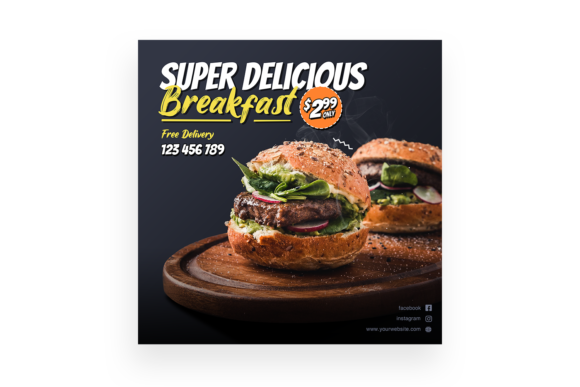
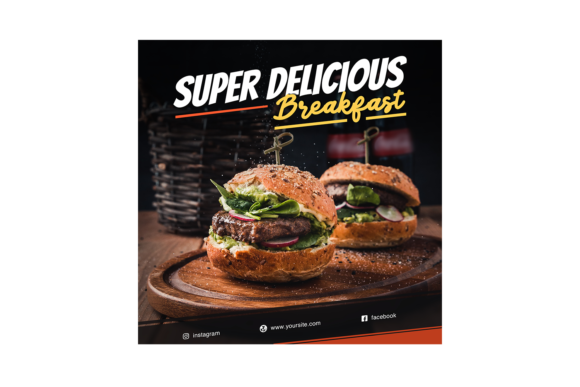
There is a specific kind of magic that happens when you scroll past a perfectly styled breakfast photo on Instagram. It stops the thumb. Whether it’s the golden glint of syrup on pancakes or the vibrant pop of fresh berries against a ceramic plate, breakfast content consistently ranks among the highest-performing categories for engagement. But creating that perfect, high-resolution look from scratch every single morning is exhausting and often requires photography skills that go beyond the average smartphone user’s repertoire. That is where the Super Delicious Breakfast Instagram Post steps in, offering a bridge between professional food styling and accessible content creation for the busy entrepreneur or designer.
More Than Just a Photo: Understanding the Smart Object Workflow
What separates a mediocre mockup from a game-changing design asset? The answer often lies in the technical foundation. This particular PSD template isn't just a static image; it is a dynamic workspace built on Smart Object Replacement. For the uninitiated, this feature is the holy grail of Photoshop efficiency. It allows you to swap out the main food imagery with just a few clicks, automatically adjusting the perspective, lighting, and shadows to match the original scene.
Imagine you are a small bakery owner launching a new seasonal croissant. You don't have time to hire a food photographer, set up lighting rigs, and edit for hours. With this template, you simply click the Smart Object layer, paste your image of the croissant, save, and instantly have a publication-ready image that looks like it was shot in a professional studio. The 3000×3000 pixel resolution and 300dpi quality ensure that your image remains crisp, whether it is viewed on a high-resolution retina display or printed out for a menu.
Building a Consistent Brand Identity
For content creators and marketers, consistency is the currency of trust. When a potential customer visits your profile, they are looking for a visual rhythm that signals reliability and quality. Sporadic lighting or inconsistent backgrounds can make a feed look disjointed and amateurish. By utilizing a template like the Super Delicious Breakfast Instagram Post, you establish a baseline for your visual storytelling.
Consider the practical applications beyond just a single Instagram post:
- Weekly Specials: Use the template every Tuesday to announce your "Taco Tuesday" or "Fresh Pastry Friday," creating a recognizable pattern for your audience.
- Blog Headers: The high resolution makes it perfect for the hero image of a recipe blog post, ensuring your site looks polished and authoritative.
- Digital Menus: For cafes moving toward QR code menus, having a library of professional-looking food shots is essential for driving sales.
The beauty of the Organised Layers structure is that it invites customization without chaos. You aren't just stuck with the default colors. Need to adjust the hue of the background to match your brand’s specific hex code? The layers allow for that. Want to tweak the brightness of the highlights to make the food look "warmer"? It’s all editable. This level of control is vital for maintaining a cohesive brand identity across various marketing assets.
The Psychology of Appetite Appeal
Why does this specific style work so well? It taps into the psychology of "appetite appeal." This is a term used in packaging design and advertising to describe imagery that triggers a visceral, hunger-driven response. The "Super Delicious" aesthetic relies on high contrast and clarity. The 300dpi quality ensures that textures—the flakiness of a croissant or the fizz in a mimosa—are visible and tangible.
When you are designing social media graphics for a client, your goal is to stop the scroll. A low-quality, pixelated image of food suggests low-quality food. Conversely, a sharp, vibrant, and professionally styled image suggests a premium experience. This template acts as a vessel for that promise. It allows you to present your product with the professional presentation usually reserved for brands with massive marketing budgets.
Practical Integration for Modern Marketing
Let’s look at how this asset fits into a broader marketing strategy. If you are a graphic designer working with a food truck client, you need assets that can be repurposed quickly. One day they need an Instagram Story, the next day a printed flyer, and the day after a header for their newsletter.
Because the file is PSD CS5 or higher compatible, it integrates seamlessly into almost any modern workflow. The ability to export different formats means you can adapt the single design for multiple channels. You can crop the square image for a vertical Story or use the full resolution for a printed poster. This versatility makes it a cornerstone of efficient content creation.
Here is a breakdown of how to maximize the file's potential:
- Test Your Pairings: The "Read Me" file included in the package is crucial here. It lists the fonts used in the preview. Use these as a starting point, but don't be afraid to experiment. If your brand uses a sans serif font for modernity, swap out the script font on the overlay text. If you are going for a rustic vibe, a handwritten font might be the perfect touch.
- Layer Management: The Editable nature of the layers means you can isolate elements. Perhaps you love the background but want to remove a specific garnish. With organized layers, you can toggle that element off without ruining the rest of the composition.
- Commercial Licensing: Always check the Credits.txt file. This is a vital step for commercial use. Knowing the licensing of the fonts and stock images used within the template protects you and your clients from copyright infringement issues down the road. It’s a small detail that separates hobbyists from professionals.
Elevating Your Visual Storytelling
Ultimately, the goal of using a premium design asset like this is to enhance your storytelling. Food is emotional. Breakfast, specifically, represents a ritual—the start of a new day, a moment of comfort, or a celebration. When you use a template that captures this mood effectively, you aren't just selling a meal; you are selling a feeling.
For the creative entrepreneur or small business owner, time is the most valuable resource. Spending hours trying to composite a breakfast scene in Photoshop is rarely the best use of that time. By leveraging a pre-made, high-quality foundation, you free yourself up to focus on the message, the copy, and the community engagement.
Whether you are revamping a cafe’s Instagram presence, designing a cookbook cover, or creating a banner for a food delivery service, the Super Delicious Breakfast Instagram Post provides the visual fidelity and flexibility required to compete in a crowded digital landscape. It transforms the daunting task of food photography into a manageable, creative, and highly effective part of your design toolkit.