Editable Email Signature Template: Design for a Professional Edge
Let's be honest, how many times have you received an email with a bland, text-only signature and immediately forgotten who sent it? In a crowded inbox, your email signature is prime real estate for reinforcing your brand, building credibility, and even driving action. It's often the last thing someone sees in your communication, making it a powerful, yet frequently overlooked, touchpoint. An editable email signature template isn't just a fancy block of text at the bottom of your messages; it's a mini billboard for your professionalism and attention to detail.
Beyond the Basics: What Makes This Template Stand Out
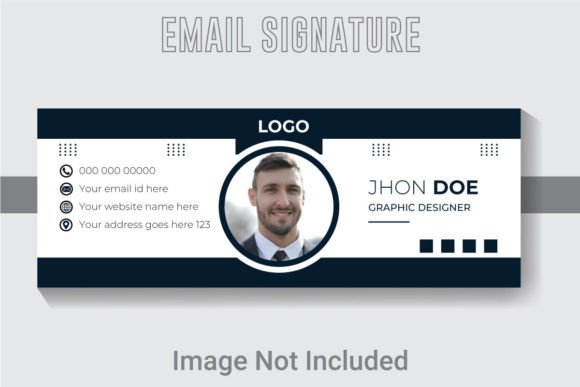
This isn't just another static image you paste into your email settings. The core of this offer is a truly editable email signature template, built as a professional design file. We're talking about a design crafted at a specific 851x315 pixel RGB color design in 300 DPI resolution. That resolution is key—it means your signature will look crisp and clear on high-resolution screens, whether it's viewed on a laptop, tablet, or a Retina display smartphone. The RGB color mode ensures your brand colors pop vibrantly in the digital environment of an email client, just as you intended.
The real magic, however, lies in the file structure. With well layered organized AI text, every element is on its own layer. Your name, your title, your social media icons, the divider line, the background color—they're all separate, movable, and fully customizable objects. This organization is what separates a professional design asset from a frustrating, locked-down graphic. You're not just filling in blanks; you're given the tools to make it your own.
Unleashing Your Brand Identity
For a small business owner or entrepreneur, consistency is the bedrock of brand recognition. Your logo, your website, your social media graphics, and your email signature should all speak the same visual language. This template allows you to do exactly that. You can match typography to project goals by selecting a font that embodies your brand's personality—whether that's a clean sans-serif for a tech startup, an elegant serif for a boutique consultancy, or a friendly handwritten font for a craft business.
Because the AI text, font, and colors are fully editable, you can input your exact brand hex codes. Have a specific teal in your logo? Use it. A signature charcoal gray for text? Apply it. This level of control ensures your email signature feels like a natural extension of your website and business cards, creating a seamless experience for every recipient. It's a practical step in solidifying your brand identity across all communications.
Practical Applications for Creatives and Professionals
The utility of a polished, editable signature extends far beyond just putting your name and number at the end of an email. Consider these real-world scenarios where this template becomes an indispensable design asset:
- Social Media Graphics & Content Creation: Need a consistent branded look for your Instagram Stories or LinkedIn posts about your services? The template's dimensions and editable layers make it easy to repurpose as a quick, professional-looking graphic for announcements or contact info.
- Digital Products & Marketing Assets: If you sell e-books, online courses, or digital downloads, a cohesive look matters. Use the template's design principles to create branded headers, footers, or promotional images that match your signature, strengthening your visual consistency.
- Freelancer & Agency Presentations: When sending proposals or project updates via email, a signature that includes a link to your portfolio or a subtle call-to-action demonstrates meticulous professionalism. It’s a silent ambassador for your work ethic.
- Event Invitations & Newsletters: For bloggers or community managers, a stylized signature at the end of a newsletter or a digital invitation adds a polished, personal touch that generic text can't achieve.
Technical Edge: Why the Details Matter
The specifications included with this template are designed for a smooth, professional workflow. The minimum version use-Adobe Illustrator CS6 of above version means you need a relatively modern but accessible version of the industry-standard software to unlock its full potential. The inclusion of 1 Ai file and 1 Eps file ensures compatibility—work natively in Illustrator or open the EPS in other vector programs like Affinity Designer or CorelDRAW. The 1 JPG file provides a quick, ready-to-use version if you just need a static image quickly.
Furthermore, the use of free fonts is a significant practical benefit. You won't be hit with unexpected licensing costs to use the exact typeface shown in the preview. This consideration is crucial for commercial licensing peace of mind, especially for small businesses and freelancers who need to manage budgets carefully. Always double-check the specific font's license for your intended use, but the template itself is built for commercial projects.
Making It Work: Tips for a Flawless Signature
Having the file is one thing; using it effectively is another. Here’s how to get the most out of your editable template:
- Choose Your Font Style Wisely: Don't just pick the prettiest font. Consider readability considerations first. A highly decorative script might look beautiful but could be illegible at a small size in an email body. Test it at 100% zoom on your screen. Does it still read clearly?
- Test Font Pairings: If you modify the template's fonts, ensure they work together. A common strategy is pairing a bold, clean sans-serif for your name with a lighter weight or complementary serif for your title and contact details. This creates hierarchy without visual clutter.
- Keep It Functional: The primary goal is to provide information. Include your essential details: name, title, company, phone number, and a key social link or website. Avoid overloading it with every possible contact method. Less is often more for professional presentation.
- Optimize for Mobile: Over half of emails are opened on mobile devices. Preview your signature on a phone screen. Is the text still readable? Are the icons tappable? The 851x315 pixel dimension is a good starting point, but always test the final result in your email client.
Ultimately, an editable email signature template is about taking control of a small but consistent part of your brand's narrative. It’s a tool that helps improve audience engagement by presenting a polished, trustworthy front. In a world where first impressions are often digital, ensuring every detail reflects your professionalism isn't just nice to have—it's a smart, practical investment in how you're perceived. It turns a mundane footer into a strategic piece of your visual communication toolkit.