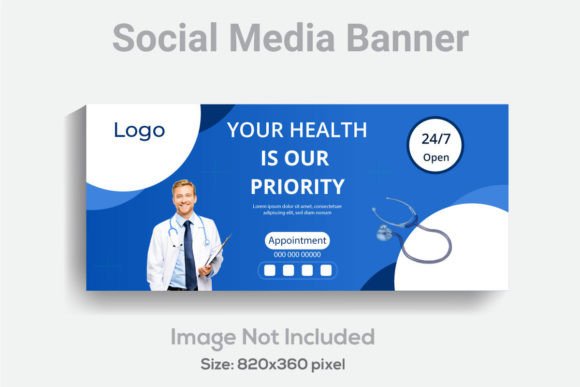
Social Media Modern Banner Template: A Designer's Go-To Asset
You're staring at a blank artboard, the cursor blinking back at you. The client needs a series of banners for a product launch across Instagram, Facebook, and LinkedIn by tomorrow. The brand guidelines are solid, but the clock is ticking. This is the moment where a high-quality, adaptable template stops being a luxury and becomes a lifesaver. A well-constructed Social Media Modern Banner Template isn't just a pre-made graphic; it's a strategic starting point that saves hours, ensures consistency, and lets you focus on the creative message rather than technical setup.
Beyond the Pixels: What Makes This Template System Work
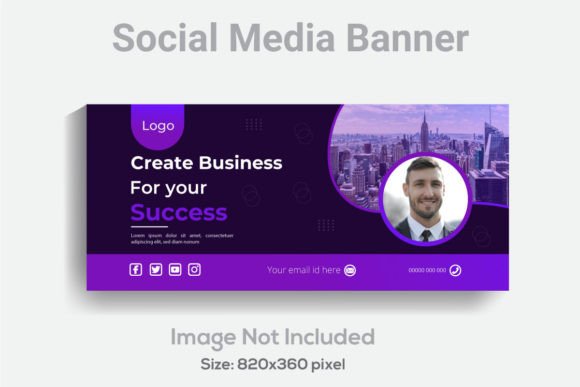
At first glance, the specifications read like a technical checklist: 820x360 pixels, 300 DPI, RGB color mode. But each detail is a deliberate choice for professional output. The 820x360 pixel dimension is a versatile rectangle that works beautifully as a Facebook cover, a Twitter header, or a LinkedIn banner without awkward cropping. Designing at 300 DPI ensures that if you ever need to pull an element from the banner for a print flyer or a poster, the quality remains crisp and clear. The RGB color mode is optimized for screen display, guaranteeing the vibrant hues you see on your monitor translate accurately to your audience's devices.
The real value, however, lies in the file structure. Receiving a single, flattened JPG is a dead end. This package delivers an Adobe Illustrator (.AI) file and an EPS file. This is the key to true customization. Every element—the background shapes, the placeholder text, the decorative lines—exists on its own layer. This isn't just "well organized"; it's a non-destructive workflow. You can isolate a single color block, adjust its gradient, or completely remove it without affecting the typography. The text is fully editable, not outlined. This means you can not only change the words but also swap the typeface to match your client's brand font, adjust kerning, or alter the weight in seconds. Using a free font within the template is a thoughtful touch, removing any licensing hurdles for the initial mockup stage.
From Template to Brand Identity: Practical Applications
Think of this template not as a finished product, but as a robust framework for visual communication. Its clean, modern aesthetic makes it a chameleon for various projects.
- Launch Campaigns & Marketing Assets: Quickly generate a cohesive set of banners for a new product. Use the same layout, swap the imagery and copy for each platform, and you have a unified campaign in under an hour. It's perfect for creating consistent social media graphics for weekly promotions or event announcements.
- Brand Identity & Style Guides: Use the template to mock up how a brand's logo, color palette, and typography work together in a real-world context. Showing a client their logo in a Facebook cover template is far more powerful than showing it on a plain white background.
- Digital Products & Content: Bloggers and course creators can use it to design consistent featured images for articles or promotional banners for email headers. The structured design ensures every piece of content looks polished and professional.
- Print Collateral: Thanks to the high resolution, elements can be repurposed. The background patterns or text blocks could inspire a brochure layout, a poster design, or even packaging accents.
Making It Yours: Typography and Pairing Strategy
The included font is your starting point, not your finish line. The true power of the editable AI file is the ability to integrate your chosen premium font or brand typeface. This is where strategic thinking comes in.
If your brand is a tech startup, you might swap the template font for a clean sans serif font like Montserrat or Poppins. For a boutique bakery or a wedding planner, a elegant script font or a sophisticated serif font could set the perfect tone. The template's layout is designed to be flexible enough to accommodate different font personalities—from bold display fonts for headlines to more readable body text alternatives.
A practical tip: Before committing, test your font pairing within the template's structure. Does your chosen heading font have enough contrast with a potential body font? Is the line spacing (leading) still comfortable to read at the banner's size? The template allows you to experiment with these typographic details in a real layout, not in isolation. This process directly improves readability and ensures your brand recognition is strengthened by consistent, professional modern typography.
Streamlining Your Workflow and Final Checks
Adopting a template like this is about working smarter. It enforces visual consistency across all your platforms, which is fundamental to building a recognizable brand. When every touchpoint—from your Instagram story to your website header—feels cohesive, your audience begins to associate that look with your message, boosting audience engagement through familiarity and trust.
Before you finalize any design, run through this quick checklist:
- License Verification: Always double-check the commercial license for any font you use, especially if it's different from the free one included. Ensure it covers your intended use, whether for a client's merchandise or your own digital products.
- Export Settings: When exporting your final JPG or PNG for web, remember to use the "Save for Web" function in Illustrator. This optimizes the file size without sacrificing necessary quality, ensuring fast load times on websites and blogs.
- Accessibility: Test your color contrast. Is the text easily readable against the background for all users? Tools like Adobe Color's accessibility checker can be invaluable here.
- Scalability: While the template is 820x360, consider how the core design elements might adapt to an Instagram square (1080x1080) or a Pinterest pin (1000x1500). The layered file makes this adaptation much easier.
In the end, a resource like the Social Media Modern Banner Template is less about providing a one-size-fits-all solution and more about handing you a versatile, professional-grade tool. It cuts down the technical friction of setup and organization, freeing you to invest your time where it matters most: in the creative strategy and storytelling that will truly connect with your audience. It’s the kind of design asset that quietly becomes indispensable in your toolkit, whether you're a solo entrepreneur managing your own brand or a designer juggling multiple client projects.