Polipac: A Keynote Template for Clean, Professional Presentations
You’ve spent hours perfecting your business plan, your product pitch, or your quarterly review. The data is solid, the strategy is sound, and your team is ready to present. But then you open your presentation software and stare at a blank, default slide deck. The thought of wrestling with alignment, color palettes, and animation timings is enough to kill your momentum before you even begin. This is where a thoughtfully designed template like Polipac - Keynote Template steps in, not as a magic wand, but as a reliable foundation that lets your content and ideas take center stage.
Designed for Real-World Scenarios
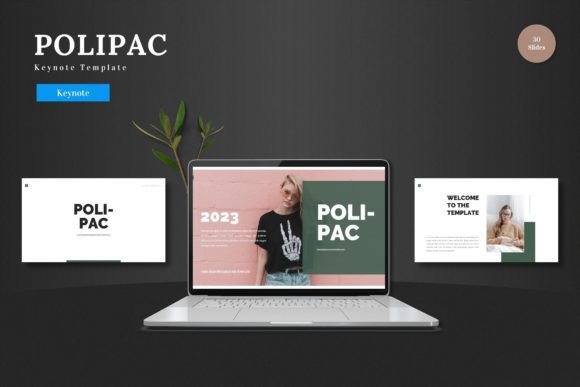
Polipac is built for the practical demands of modern professionals. Its clean, scalable, and colorful design is intentionally multipurpose, making it a versatile asset for a wide range of applications. Imagine preparing a pitch deck for investors; you need slides that communicate professionalism and clarity without distracting from your numbers. For an e-commerce brand, you might be showcasing new product lines or a seasonal promotion. The template’s structure, with dedicated sections for product promotion and portfolio galleries, allows you to present your offerings in a visually organized and appealing way. Even for internal uses like business reviews or team training, the consistent aesthetic maintains a level of professional presentation that reinforces your brand’s credibility.
Flexibility Without the Software Hurdle
One of the standout features of Polipac is its commitment to user-friendly customization. Every element is editable directly within Keynote Slides, eliminating the need for additional design software. This is a significant advantage for small business owners, entrepreneurs, and content creators who may not have advanced graphic design skills but still need to produce polished materials. You can input your own content, swap placeholder images with a simple drag-and-drop, adjust the color scheme to match your brand guidelines, and leverage pre-built animated slides to add a dynamic flow to your narrative. This accessibility ensures that the final product feels uniquely yours, not like a generic template everyone else is using.
The Anatomy of a Ready-to-Use Asset
The value of a template is often in the details. Polipac includes over 150 total slides, divided into five premade color schemes with 30 slides per template. This variety means you’re not stuck with a single look. You can choose a palette that resonates with your project’s mood—whether it’s energetic and vibrant or sleek and corporate. The inclusion of section break slides helps you structure your presentation logically, guiding your audience through your story. For those focused on brand identity and visual consistency, having handcrafted infographics and pixel-perfect illustrations that are all resizable and editable is a major benefit. It ensures your charts, diagrams, and icons align perfectly with your overall design language, strengthening brand recognition.
From Slides to Broader Brand Assets
While designed for Keynote presentations, the principles and assets within Polipac can inspire and support other facets of your brand’s visual communication. The clean typography, balanced layouts, and cohesive color palettes provide a fantastic reference point for your broader design projects. For instance:
- Social Media Graphics: The slide layouts can be adapted as templates for Instagram carousels or Facebook ads, ensuring your social presence matches your presentation style.
- Print Materials: The scalable graphics and structured layouts can inform the design of one-pagers, brochures, or event posters.
- Digital Products & Marketing: The visual system helps maintain a unified look across email newsletters, website banners, and digital product guides.
Thinking of your presentation template as part of a larger design asset toolkit helps build a more recognizable and professional brand across all touchpoints.
Practical Advice for Getting the Most Out of It
To truly leverage a tool like Polipac, approach it with a strategic mindset. First, choose the right color variation that aligns with your brand or the specific message of your presentation. Test it on a few key slides before committing. Next, focus on typography. While the template uses specific fonts, ensure they are legible at different sizes, especially for body text. Font pairing is crucial here; if you need to introduce a secondary typeface for contrast, do so sparingly to maintain readability and hierarchy. Always review the included slide types—from title slides to image-heavy galleries—and use them as intended. A “section break” slide, for example, is perfect for transitioning between major topics, giving your audience a mental pause. Finally, remember that customization is key. Replace placeholder images with high-quality, relevant photos. Adjust colors to your exact brand hex codes. The template is a starting point; your content and personalization make it powerful.
In the end, tools like the Polipac - Keynote Template are about removing friction. They handle the foundational design work, allowing you to focus on what you do best: crafting your message, sharing your vision, and connecting with your audience. By providing a clean, adaptable, and comprehensive set of slides, it helps ensure that the first thing your audience sees is a reflection of your professionalism and attention to detail, setting the stage for everything you have to say.