Badewo Keynote Template: Your Presentation's New Best Friend
Let’s be honest: most presentations are forgettable. They’re either a wall of text on a plain white background or a chaotic mess of clashing colors and awkward animations. If you’ve ever sat through one, you know the feeling—your mind wanders, you check your phone, and the speaker’s message gets lost in the visual noise. Now, flip that scenario. Imagine you’re the one presenting. You have a groundbreaking idea, a crucial business proposal, or a product launch that could change everything. How do you ensure your audience doesn’t just hear you, but truly sees your vision? The answer often lies in the framework you build your story upon. A powerful, professionally designed slide deck isn’t just decoration; it’s the stage for your ideas. This is where a tool like the Badewo - Keynote Template steps in, not as a magic wand, but as a reliable, high-quality foundation to build something remarkable.
Beyond the Slides: A Framework for Visual Storytelling
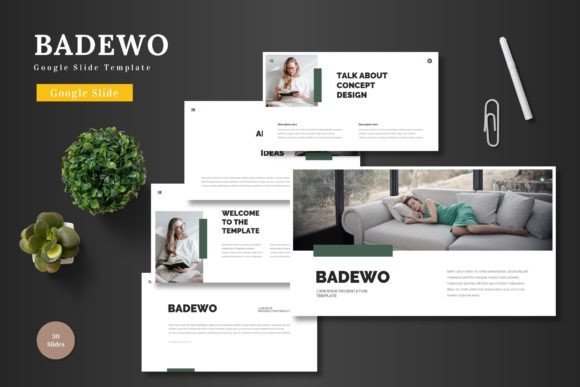
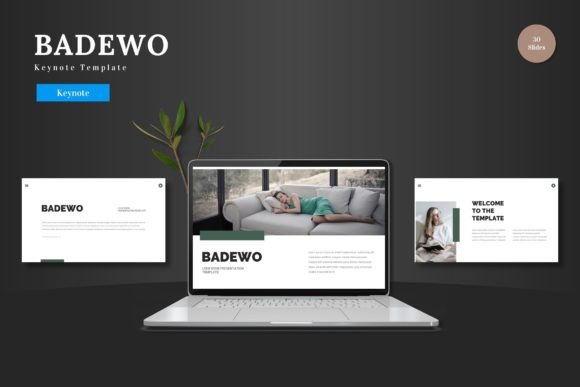
Think of Badewo less as a collection of slides and more as a versatile visual language system. Its strength lies in its clean, scalable, and multipurpose design. This isn’t a template locked into a single aesthetic; it’s a chameleon. The five premade color schemes—each with 30 dedicated slides—allow you to instantly adapt the entire mood of your presentation. Need a crisp, corporate feel for an investor pitch? There’s a palette for that. Launching a vibrant, playful e-commerce product? Another palette is ready to go. This flexibility is crucial for maintaining brand consistency across different types of content. You’re not starting from scratch each time; you’re applying a proven, cohesive visual identity to a new context. The master slide structure ensures that every element, from fonts to spacing, remains uniform, which is the bedrock of professional design. It eliminates that amateurish feeling of slides that look like they were made by five different people.
From Pitch Deck to Portfolio: Where Badewo Shines
The true test of any design asset is its real-world application. Where does this template actually solve problems? Consider the entrepreneur crafting a pitch deck. With Badewo, you can replace the placeholder images with your own product shots or team photos via simple drag-and-drop, and the handcrafted infographics become powerful tools to visualize data, market size, or growth projections. For a content creator or blogger, the gallery and portfolio slides are perfect for showcasing work, whether it’s photography, graphic design, or even a collection of written pieces in a visually engaging way. Marketing teams will find immense value in creating consistent internal reports, social media strategy decks, or client campaign presentations that all share a recognizable brand language. The animated slides, when used sparingly, can add a professional polish—think a subtle reveal for a key statistic or a smooth transition to a new section. It’s about using motion to enhance comprehension, not to distract.
The Practicalities: Editing Without the Headache
One of the biggest barriers to good design is the tool itself. Many templates promise ease but deliver frustration, requiring software you don’t own or skills you don’t have. Badewo’s commitment to being fully editable within Keynote itself is a significant practical advantage. You don’t need to jump into Illustrator to tweak an icon or Photoshop to resize a graphic. Every shape, every chart, every element is natively editable. This means your workflow stays streamlined. You can input your content directly, adjust the color scheme to match your brand’s hex codes in minutes, and have a presentation ready for its debut without a steep learning curve. This focus on accessibility doesn’t sacrifice quality. The pixel-perfect illustrations and resizable graphics ensure that even as you customize, the output remains sharp and professional on any screen, from a laptop to a large conference display.
Making It Your Own: Strategy Over Decoration
Having a great template is one thing; using it effectively is another. The key is to treat Badewo as a starting point, not an end point. Before you even open the file, define your presentation’s goal and audience. Is this a persuasive pitch to secure funding? An informative workshop for your team? A celebratory showcase for your portfolio? Your goal dictates which of the 150+ slides you’ll use and how you’ll adapt them. Don’t feel obligated to use every slide. Curate ruthlessly. A cluttered deck with 50 slides can be less effective than a focused one with 15 powerful, well-spaced slides. Use the section break slides to create natural pauses and help your audience mentally organize the information. When choosing between the color schemes, think about the emotional response you want to evoke and the context of your brand. Test your typography choices within the template’s structure to ensure headings, body text, and captions all maintain excellent readability. Remember, the goal is to support your message, not overshadow it with design flair.
Ultimately, a tool like the Badewo - Keynote Template is about empowerment. It gives you the structural integrity and visual polish that might otherwise require hiring a professional designer or spending days wrestling with software. It’s for the small business owner who needs to look as established as a Fortune 500 company in a pitch meeting. It’s for the freelancer who wants their portfolio to communicate sophistication and skill. It’s for the team leader who needs to convey complex information clearly and engagingly. By providing a clean, adaptable, and high-quality canvas, it allows you to focus your energy on what truly matters: your story, your data, and your connection with the audience. So, when you’re ready to move beyond the ordinary and give your ideas the presentation they deserve, you have a reliable framework waiting to be customized. Cheers to presenting your work with confidence.