Streamline Your Next Pitch with the Barince Keynote Template
There is a specific kind of dread that hits when you open a blank presentation file. You have the data, you have the strategy, and you have the vision, but staring at that white rectangle with the blinking cursor can freeze even the most seasoned entrepreneur. We have all been there—wrestling with alignment boxes, trying to match hex codes, and spending hours resizing charts that just won't cooperate. For designers, small business owners, and marketers, time is the one currency we cannot print more of. This is where the efficiency of a robust design asset becomes less of a luxury and more of a necessity. The Barince Keynote Template isn't just about making slides look pretty; it is about removing the friction between your ideas and a polished, professional delivery.
The Architecture of Efficiency: What 150+ Slides Really Means for You
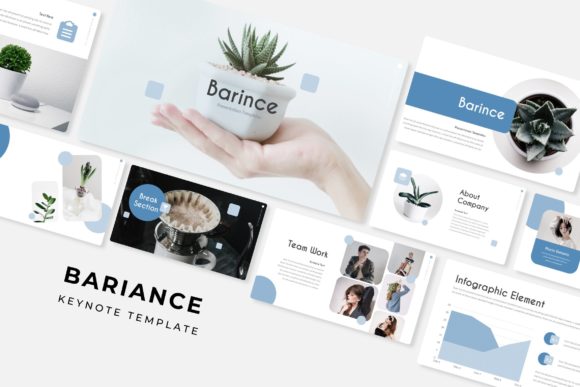
When we talk about the Barince Keynote Template, the sheer volume of content is often the first thing that catches the eye. Featuring over 150 total slides, built upon 5 premade color variations, this collection offers a massive library of visual communication tools. However, it is important to understand what this volume actually represents in a practical workflow. It isn't about having 150 pages to fill; it is about having the exact right layout for every specific piece of information you need to convey.
Imagine you are putting together a quarterly marketing review. You need a title slide that commands attention, followed by a mission statement, a timeline of achievements, data-heavy charts, team introductions, and a portfolio showcase. In a standard, off-the-shelf template, you might find one or two generic chart layouts. With Barince, you are looking at 30 distinct slides for each of the five color templates. This depth allows for granular customization. You can choose a handcrafted infographic that perfectly suits a complex dataset rather than forcing your numbers into a generic pie chart. This level of detail transforms the presentation from a simple slideshow into a comprehensive design asset that elevates your brand identity.
Visual Cohesion and the Power of Color Psychology
One of the most challenging aspects of editorial design and packaging design is maintaining visual consistency. A disjointed presentation can subconsciously signal a lack of organization to a potential client or investor. The Barince template addresses this by offering five distinct, premade color palettes. This feature is a game-changer for those who struggle with color theory or simply want to speed up the production process.
These aren't just random colors; they are curated schemes designed to evoke specific moods—whether you need the trust-building blues for a corporate pitch or the energetic oranges for a creative agency proposal. Because the template is resizable and editable, you can easily tweak these palettes to match your exact logo design guidelines. This ensures that every slide reinforces your brand recognition. When your audience sees a color palette that feels harmonious and intentional, they are more likely to trust the information being presented. It is a subtle form of visual communication that speaks volumes about your attention to detail.
Master Slides and the "Drag & Drop" Workflow
For the uninitiated, the term "Master Slides" might sound technical, but for a designer or a busy entrepreneur, it is the secret weapon of modern typography and layout. The Barince Keynote Template is built entirely on this system, which means the structure of the presentation is solid and predictable. You aren't fighting the software; you are working with it.
The inclusion of picture placeholders takes this a step further. In the world of social media graphics and web design, speed is essential. If you are a content creator preparing a pitch deck for a sponsor, you don't want to spend twenty minutes cropping and resizing a photo of your latest product. With the drag-and-drop functionality, you simply grab your image from the desktop and drop it into the designated area. The template handles the cropping and positioning. This "pixel-perfect" approach ensures that your images are never distorted or awkwardly framed, maintaining the professional sheen required for commercial projects.
Beyond the Slideshow: Versatility in Application
While the file format is designed for Keynote presentations, the utility of the Barince Keynote Template extends far beyond a simple meeting room pitch. Think of these slides as modular design blocks. Because the graphics are vector-based and editable, they can be repurposed for a variety of marketing assets.
For instance, a section break slide with a striking geometric background could easily be exported as a high-resolution image for an Instagram post or a blog header. The handcrafted infographics are perfect candidates for print materials like brochures or annual reports. If you are a small business owner launching a new product, you could use the portfolio slides to create digital products lookbooks or invitations for a launch event. The versatility of having premade colors and editable graphics means you can maintain a cohesive aesthetic across your posters, merchandise, and digital presence without starting from scratch every time.
Technical Polish: Fonts, Readability, and Delivery
A beautiful layout is useless if the text is illegible. The creators of the Barince template understand that readability is paramount, especially when presenting complex data. The template utilizes free fonts, with download links included in the package. This is a crucial detail for commercial licensing; you don't want to build a presentation around a typeface you don't have the rights to use or cannot install on different computers.
The typography choices within the template balance serif and sans serif styles to create a natural hierarchy, guiding the viewer's eye from headlines to body copy. This thoughtful approach to typeface selection helps improve audience engagement. When text is too small or cramped, people tune out. When it is well-spaced and styled, they lean in. The "Readme First" file included in the package is a testament to the user-centric design of this product, ensuring that even those with minimal technical experience can get the template up and running immediately.
A Practical Guide to Customization
To get the most out of a premium asset like this, it helps to approach it with a strategy. Don't just open the file and start clicking. Here is a practical workflow for integrating the Barince Keynote Template into your next project:
- Define Your Narrative: Before touching the slides, outline your story. Are you selling a service, pitching an idea, or educating a team? This will dictate which of the 150+ slides you actually need.
- Select Your Color Variation: Look at the five included options. Which one aligns best with the emotion you want to evoke? If none are perfect, use the Master Slides to input your specific brand hex codes once, and watch the entire deck update.
- Curate Your Imagery: Gather your high-resolution photos beforehand. Use the picture placeholders to maintain consistency. Avoid using low-quality stock images that clash with the pixel-perfect illustrations provided in the template.
- Test Your Pairings: While the template provides great fonts, feel free to experiment if your brand guidelines require it. Ensure any new font pairings maintain the readability standards set by the original design.
- Repurpose Assets: Once your presentation is done, look at it as a toolkit. Export those infographics for your next newsletter or use the title slides as website hero images.
Ultimately, the Barince Keynote Template serves as a bridge between raw data and polished design. It acknowledges that while content is king, presentation is the throne upon which it sits. For the busy professional, the creative entrepreneur, or the meticulous designer, having a tool that handles the heavy lifting of layout and consistency allows you to focus on what really matters: your message.