Anabys Keynote Template: A Deep Dive into Its 150+ Slide Versatility
Imagine this: you've got a brilliant concept for a new product, a quarterly business review, or a creative portfolio to present. The ideas are solid, the data is compelling, but the thought of building a presentation from scratch feels like a monumental task. You open your software, stare at a blank slide, and the creative block hits. This is where a powerful, pre-built foundation like the Anabys Keynote Template changes the game, transforming that blank canvas into a launchpad for professional, visually stunning storytelling.
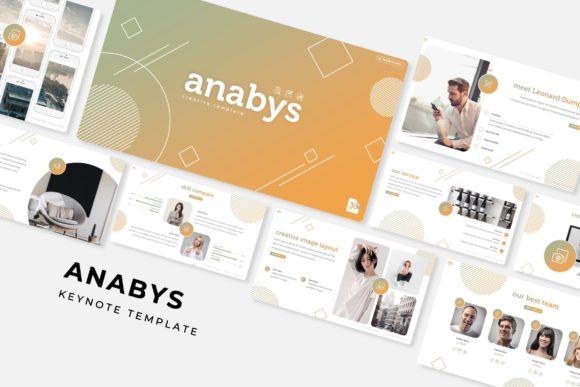
At its core, Anabys is more than just a collection of slides; it's a comprehensive presentation ecosystem designed for individuals and teams who value both efficiency and high-end design. The template boasts an impressive library of over 150 total slides, meticulously organized across five premade color palettes. This means you get 30 unique slide layouts for each of the five color schemes, offering an incredible range of options right out of the box. Whether your brand identity calls for cool corporate blues, warm creative tones, or sleek monochromatic shades, there's a variation ready to align with your vision. The structure is built on master slides, ensuring that every element, from fonts to color fills, is interconnected and easy to update globally with a single click.
Beyond Static Slides: The Power of Handcrafted Infographics and Flexible Assets
What truly sets a premium presentation template apart is the quality and utility of its individual components. Anabys excels here with its handcrafted infographics. These aren't generic, auto-generated charts. They are thoughtfully designed visual aids—think process flows, comparison tables, timeline graphics, and data visualization elements—crafted to make complex information digestible and engaging. For a marketing professional presenting campaign results or a startup founder explaining a business model, these infographics are invaluable. They help maintain visual consistency and professional presentation, which are key to holding an audience's attention and improving brand recognition during a pitch or talk.
Furthermore, the practical design considerations baked into Anabys are a major time-saver. The inclusion of section break slides provides a clean, visual pause between topics, helping to structure your narrative. Gallery and portfolio slides are perfectly laid out to showcase work, whether you're a designer, photographer, or agency. Perhaps one of the most appreciated features for the time-pressed professional is the resizable and editable graphic picture placeholder system. This drag-and-drop functionality, based on the master slides, allows you to swap images seamlessly without distorting your layout. You can focus on your content and story rather than wrestling with formatting. It’s this pixel-perfect attention to detail that elevates a presentation from good to exceptional.
Practical Applications: From Boardroom Pitches to Creative Showcases
The versatility of a template like Anabys makes it a valuable asset across numerous professional and creative domains. Its clean, modern typography and structured layouts serve as a fantastic foundation for a wide array of projects.
- Branding and Identity: Use the consistent color schemes and master slide structure to create a branded presentation deck that reinforces your visual identity at every touchpoint.
- Marketing and Sales: Build compelling sales pitches, product launch decks, and marketing strategy presentations that look polished and authoritative.
- Education and Training: Develop clear, engaging educational materials, workshop decks, or internal training guides with well-organized content and visual aids.
- Portfolio and Case Studies: Creatives can leverage the gallery layouts to present their work in a sophisticated, narrative-driven format that impresses potential clients.
- Startup and Investor Pitches: The structured flow and professional infographic slides are ideal for conveying a business plan, market analysis, and financial projections clearly to investors.
For a small business owner, this means not needing to hire a designer for every presentation. For a content creator, it means having a reliable, high-quality tool for webinars or course content. The template acts as a design asset that ensures your visual communication is always on point, saving hours of work while maintaining a high standard of quality.
Getting Started and Making It Your Own
Upon downloading, the package includes everything you need to begin immediately. You receive five PPTX files (for standard aspect ratio) and five PPTX files formatted for widescreen displays, each corresponding to one of the five premade color schemes. A Readme First file guides you through the setup, and crucially, the font used in the design is a free download, with the link included. This eliminates the common frustration of opening a template only to find missing fonts that disrupt the entire layout.
While the template provides a stellar starting point, the real magic happens when you adapt it to your unique needs. Here’s some practical advice for customization:
- Start with the Master Slides: Before editing individual slides, visit the master slide view. Changing fonts, color palettes, or logo placement here ensures global consistency across your entire presentation.
- Leverage the Color Variations: Don't feel locked into one scheme. Experiment with the five included palettes to see which best matches your project's mood or your existing brand colors.
- Test Font Pairings: The included font is chosen for its clarity and modern appeal. If you need to pair it with another typeface for headings or body text, ensure you choose a complementary style—a classic serif can pair well with a clean sans-serif, for example—to enhance readability and hierarchy.
- Use the Placeholders: Embrace the drag-and-drop picture placeholders. Prepare your high-quality images in advance and simply drop them in. This maintains the pixel-perfect integrity of the design.
- Consider Your Audience: Tailor the infographics and slide choices to your audience's needs. A data-heavy slide might be perfect for an internal report but could be simplified for a public keynote.
Remember, the photographs and mockup images used in the template preview are for illustration only and are not included in the final download. This is standard practice, allowing you to insert your own original content that truly represents your brand or project. The Anabys Keynote Template is ultimately a powerful tool in your design arsenal—a professionally crafted framework that empowers you to communicate with clarity, confidence, and visual impact, turning your ideas into presentations that resonate and persuade.