Clarity in Data: The CareHub Dashboard for Clinical Insights
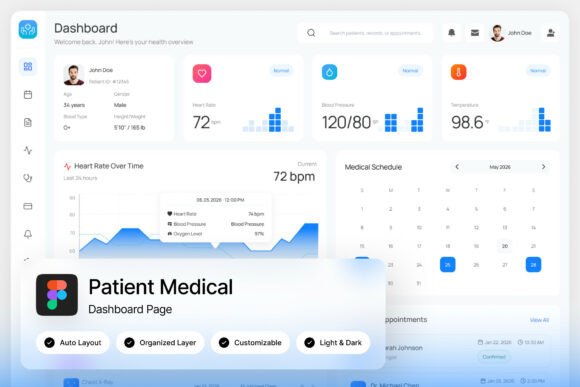
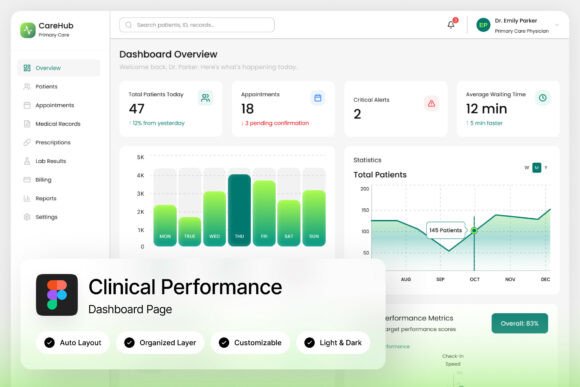
Imagine opening a software interface and immediately understanding the vital signs of your entire organization without squinting at complex spreadsheets or deciphering confusing icons. That is the promise of a well-executed dashboard, and for those working in medical technology, hospital administration, or health-focused SaaS, the visual component is just as critical as the data itself. A cluttered interface leads to cognitive fatigue, while a clean, intuitive layout fosters trust and efficiency. This is where the CareHub Clinical Performance Dashboard L enters the conversation. It is not merely a collection of charts; it is a design system built to transform dense clinical analytics into a visual narrative that is easy to digest.
A Visual Language of Trust and Precision
When we talk about design assets in the healthcare sector, the aesthetic requirements are unique. You cannot rely on the playful, chaotic energy often found in lifestyle or entertainment branding. Instead, the visual language must convey stability, accuracy, and calm. CareHub achieves this through a "clean UI" approach that prioritizes whitespace and legibility. The design uses a muted, professional color palette that avoids visual noise, ensuring that when a spike appears in a patient monitoring chart or a metric dips in a hospital administration report, the user’s eye is drawn there immediately.
For designers and developers building medical SaaS platforms, this template offers a masterclass in information hierarchy. It demonstrates how to organize layers and groups logically. The pixel-perfect layout ensures that whether you are presenting this on a high-resolution monitor or a tablet during rounds, the interface remains sharp. The inclusion of both light and dark modes is not just a trendy feature; in a clinical setting, a dark mode can reduce eye strain during long night shifts, while a light mode offers high contrast for bright environments. This versatility makes it a robust foundation for any project requiring high-end visual communication.
Beyond the Screen: Translating Digital Assets to Physical Branding
While this asset is technically a digital interface template, its utility extends far beyond the boundaries of a browser window. If you are a small business owner or a creative entrepreneur in the wellness or health space, the design principles embedded in CareHub can serve as the backbone for your entire visual identity. Think of the dashboard’s layout as a starting point for your brand’s "visual voice."
The typography choices included in the package are particularly valuable. Good typography is the engine of design consistency. When you download the CareHub package, you gain access to specific font links that pair well together. You can take these typefaces and apply them to a variety of commercial projects to maintain that professional, clinical aesthetic:
- Packaging Design: If you are launching a line of supplements or medical equipment, use the clean sans-serif styles from the dashboard for your product labels. It communicates safety and modernity instantly.
- Print Materials: Brochures, informational pamphlets, or posters for a clinic benefit from the high readability of a dashboard font. It ensures that critical health information is accessible to everyone.
- Social Media Graphics: Consistency is key on platforms like Instagram or LinkedIn. By pulling the color codes and font styles from the CareHub layout, you can create a cohesive grid that looks polished and authoritative.
- Editorial Layouts: If you are publishing a medical blog or a digital health magazine, the layout principles of the dashboard—specifically how it handles data visualization—can inspire how you lay out infographics and pull quotes.
Practical Advice for Implementation and Pairing
One of the most common mistakes in design is treating typography as an afterthought. However, when you are dealing with data-heavy interfaces or marketing assets for professional services, the typeface carries the weight of your message. The CareHub dashboard is fully customizable, which gives you the freedom to experiment, but you should approach edits with a strategy.
First, consider the "personality" of your project. The default fonts in a medical dashboard are usually sans-serif because they are optimized for screen readability and neutrality. If you are adapting this style for a logo design or a wedding invitation for a medical charity gala, you might need to introduce a script or handwritten font to add warmth. The rule of thumb is to pair a highly functional font (like the one used for the dashboard’s data points) with a more expressive display font for headers. This creates a dynamic contrast that guides the viewer’s eye.
Second, do not underestimate the power of testing. Just because a font looks good on the 1440x1024 resolution preview provided in the Figma file does not mean it will work perfectly on a mobile screen or a printed flyer. Always test your font pairings at multiple sizes. Check the leading (line height) and tracking (letter spacing). In a dashboard, tight tracking works for data labels, but in a blog post or marketing email, you need more breathing room to maintain readability.
Finally, keep an eye on your layers. The CareHub file comes with well-organized, named, and grouped layers. When you move from the design phase to the development or printing phase, this organization saves you hours of headache. It allows you to export assets quickly and ensures that your brand identity remains consistent across every touchpoint, from a mobile app interface to a physical business card.
Maximizing Your Design Investment
Investing in a premium design asset like this is about saving time and elevating quality. Instead of starting from scratch to build a data visualization system, you have a professional foundation that adheres to modern design standards. This allows you to focus on the content—whether that is patient data, sales metrics, or marketing copy—rather than struggling with pixel alignment.
The value lies in the details: the subtle shadows, the precise grid systems, and the thoughtful use of iconography. These elements combine to create a user experience that feels premium. For freelancers and agencies, using a high-quality template like CareHub as a base allows you to deliver enterprise-level design to your clients without the enterprise-level budget. It is a practical tool for bridging the gap between raw data and beautiful, actionable insights.