Streamlining Clinical Workflows with a Patient Dashboard
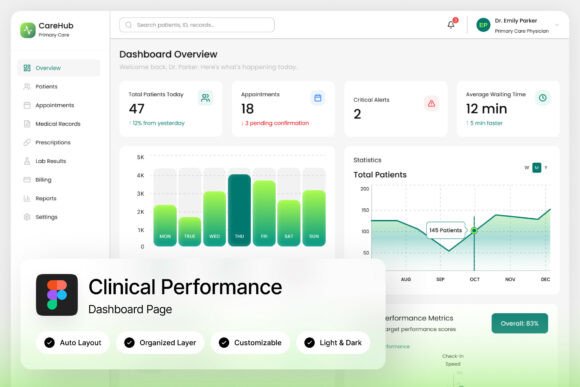
Imagine walking into a hospital command center where every vital sign, appointment schedule, and patient history is organized into a single, intuitive visual interface. That is the promise of a modern Health Care Patient Medical Dashboard. For designers, developers, and healthcare administrators, having a pre-built, high-quality template for these systems isn't just about aesthetics—it is about saving hundreds of development hours and ensuring that critical data is accessible at a glance. When you are building a platform for hospital monitoring or patient management, the user interface is the bridge between complex data and life-saving decisions. A well-structured dashboard template provides the foundation for that bridge, offering a pixel-perfect layout that balances functionality with a clean, medical-inspired aesthetic.
Visual Design and Technical Precision
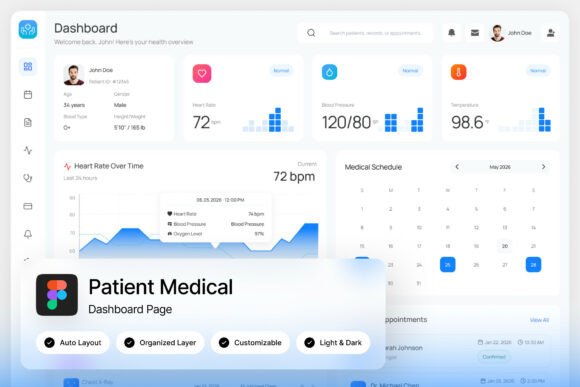
What sets a professional dashboard template apart from a basic wireframe is the attention to detail in the design system. This specific resource comes equipped with two high-quality screen resolutions set at 1440x1024 px, providing ample real estate to display complex analytics without feeling cluttered. The design embraces a modern, stylish look that moves away from the sterile, confusing interfaces of legacy hospital software. Instead, it uses intuitive UI components that make navigation feel natural for both medical staff and patients.
For the creative professional or developer, the technical delivery of the file is just as important as the visual design. The package includes a fully customizable Figma file (.fig), which means you have complete control over every vector shape, color swatch, and text layer. The layers are well-organized, named, and grouped, which eliminates the frustration of digging through "Layer 1" or "Group 54" to find a specific button. This organization is crucial when you need to adapt the template to specific branding guidelines for a private clinic or a large hospital network. Furthermore, the inclusion of both Light and Dark mode interfaces is a massive advantage. In a healthcare setting, lighting conditions vary wildly—brightly lit nurse stations versus dimly lit monitoring rooms at night—and offering a toggle between modes ensures user comfort and reduces eye strain during long shifts.
Practical Applications Across the Medical Ecosystem
While the primary use case is clearly within a hospital monitoring platform or medical administration tool, the versatility of a robust dashboard extends much further. Consider the needs of a HealthTech startup developing a new patient portal. They need to present data regarding appointment history, billing, and prescription management in a way that doesn't overwhelm the user. Using this template allows them to prototype rapidly, testing their user flow with a polished interface rather than a rough sketch.
Beyond the screen, the design principles found in a high-quality medical dashboard can influence broader branding efforts. The clean lines, clear typography, and structured grid systems used in medical UI design translate exceptionally well to other professional contexts. For instance:
- Brand Identity: The color palettes used in medical dashboards—often calming blues, crisp whites, and alert greens or reds—can form the basis of a cohesive brand identity for wellness apps, fitness trackers, or telehealth services.
- Marketing Assets: If you are pitching a healthcare product to investors, using the dashboard mockups in your pitch deck or social media graphics adds a layer of professionalism and "product readiness" that static logos cannot achieve.
- Editorial and Web Design: The layout grids designed for data visualization are perfect for structuring information-heavy web pages or editorial layouts in digital magazines. The way a dashboard organizes cards and widgets can inspire how you layout product features on a landing page.
Tailoring the Template for Maximum Impact
Even though this is a specialized tool for healthcare, the customization possibilities are endless. The template includes free Google Fonts, which ensures that you aren't restricted by expensive licensing for typography during the development phase. However, for a final commercial product, you might want to swap these out for a premium font or a specific sans-serif typeface that aligns with your client's brand guidelines. Because the file is vector-based and built in Figma, resizing elements for different contexts—whether it's a large desktop monitor or a tablet used by visiting doctors—is seamless.
When customizing your Health Care Patient Medical Dashboard, focus on the hierarchy of information. Medical professionals need to see critical alerts immediately. Use the "well-organized layers" feature to highlight specific data points or change the opacity of background elements to make foreground data pop. You can also repurpose the UI components for non-medical projects. For example, the progress bars and status indicators are perfect for a project management tool or a fitness tracking app. By stripping away the medical icons and replacing them with general business or lifestyle icons, you transform a clinical tool into a versatile business asset.
Integrating Typography and Layout for Readability
One of the most overlooked aspects of dashboard design is typography. In a data-heavy environment, readability is paramount. This template likely utilizes a clean sans-serif font family, which is the industry standard for digital interfaces due to its legibility on screens at small sizes. When you are editing this template, pay close attention to the font pairing. If the template uses a bold, geometric sans-serif for headers, consider pairing it with a humanist sans-serif for body text to add warmth and approachability—qualities that are vital in patient-facing healthcare apps.
Do not underestimate the power of white space. A common mistake in medical administration tools is trying to cram too much data onto one screen. The "pixel-perfect layout" of this template should already account for breathing room, but if you add new elements, ensure you maintain those margins. Good typography and spacing improve visual consistency and ensure that the user can scan information quickly. Whether you are designing a poster for a health seminar or a complex analytics platform, the principles remain the same: clarity, hierarchy, and ease of use.
From Concept to Deployment
For the entrepreneur or small business owner, investing in a high-quality design asset like this dashboard template is about speed to market. You don't need to hire a UI/UX agency from scratch to build a functional prototype. With the Figma file, Help Guide (.pdf), and Font Links (.txt) included in the zip file, you have a turnkey solution to start visualizing your product.
Ultimately, a great dashboard is more than just charts and graphs; it is a communication tool. It tells the story of a patient's health, the efficiency of a hospital's operations, or the success of a treatment plan. By starting with a professionally designed, modern template, you ensure that your visual communication is as advanced as the technology driving it. Whether you are building the next big telemedicine app or simply need a high-fidelity mockup for a client presentation, this resource provides the foundation for a polished, professional result.