Syncra Report Dashboard: Streamlining Modern Team Collaboration
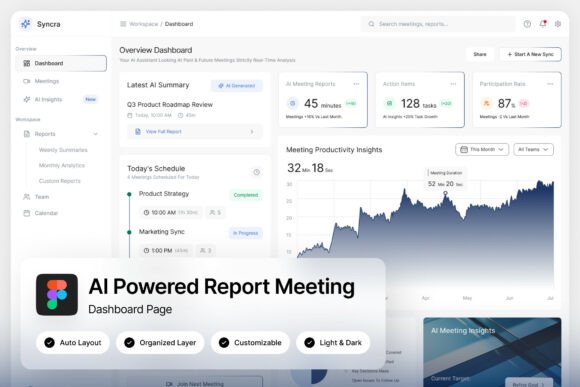
Imagine a workspace where every meeting summary, action item, and productivity metric lives in one visually cohesive hub. That’s the core idea behind the Syncra Report Dashboard—a sleek, dark-themed interface designed to transform how teams track progress and collaborate. With its cool blue gradient aesthetic and AI-powered features, it’s built for the pace of modern workflows, especially for remote teams and SaaS platforms aiming to cut through clutter and focus on what matters.
A Visual Blueprint for Focused Workflows
What immediately stands out about Syncra is its thoughtful visual design. The dark mode isn’t just a trend—it reduces eye strain during long work sessions and creates a professional, immersive environment. Paired with a subtle blue gradient, it guides attention without overwhelming the user. This isn’t merely a pretty interface; it’s a functional tool where agenda trackers, action item panels, and productivity charts are arranged for quick scanning. For designers and developers building collaboration tools, this layout serves as a real-world reference for balancing data density with clarity.
Each element is pixel-perfect at 1440×1024 px resolution, making it ideal for high-resolution displays. The layers are well-organized and named, so customizing colors, rearranging modules, or integrating your own branding assets is straightforward. If you’ve ever struggled with messy design files, you’ll appreciate the clean structure here—it saves hours during implementation.
Practical Applications Beyond the Dashboard
While Syncra is designed as a meeting and report dashboard, its design language translates surprisingly well to other projects. Think about your brand’s visual identity: the same principles of clean data visualization, intuitive navigation, and cohesive color schemes apply to everything from social media graphics to website dashboards. The cool blue gradient, for instance, could inspire a branded color palette for a tech startup’s marketing materials—maintaining visual consistency across presentations, internal tools, and customer-facing assets.
For packaging designers or editorial layout artists, the dashboard’s typography and spacing offer lessons in readability. Notice how the interface uses hierarchy—clear headings for meeting summaries, subtle labels for charts, and ample white space (or in this case, dark space) to prevent cognitive overload. Applying similar typographic choices to a brochure or a digital product manual can elevate professionalism and audience engagement. Even for something as simple as a project proposal or a team newsletter, borrowing Syncra’s balanced approach to information architecture can make your content more digestible.
Choosing and Pairing Fonts with Intention
Typography is the silent ambassador of your design. In Syncra’s case, the included Google Fonts are selected for both style and function—likely a modern sans serif for body text and a complementary display font for headings. When selecting fonts for your own projects, start by considering the project’s personality. A sleek, tech-focused brand might lean into geometric sans serifs, while a creative agency could experiment with a bold display font paired with a readable serif for longer text.
Always test font pairings in context. Mock up a social media post, a landing page section, or a print ad before finalizing. Check readability across devices—what looks crisp on a desktop might blur on mobile. Syncra’s design, with its clear hierarchy and spacing, reminds us that even the most beautiful font fails if it sacrifices function. Review the included font styles in the zip file: understanding the full range (from light to bold, italic to condensed) helps you make informed decisions about weight and emphasis in your designs.
From Concept to Commercial Use
One of the biggest advantages of using a resource like the Syncra Report Dashboard is the jump-start it gives to your creative process. Instead of starting from a blank canvas, you have a polished, production-ready template that’s fully customizable. For small business owners, this means faster iteration on internal tools or client presentations. For content creators, it’s a source of inspiration for structuring information-heavy graphics like infographics or data-driven blog posts.
Remember to consider commercial licensing if you plan to use elements from the dashboard in client work or products for sale. The included help guide and font links likely clarify usage rights—always double-check to avoid legal hiccups. Beyond that, think about how you can adapt the design’s principles rather than just its pixels. Could you extract the color scheme for your brand’s website? Could the chart layouts inform your next annual report? The real value lies in learning from its design logic and applying those insights to your unique projects.
Ultimately, tools like Syncra are about more than aesthetics—they’re about creating systems that support better work. Whether you’re building a remote team toolkit, designing a SaaS interface, or simply refining your brand’s visual language, the blend of dark-themed elegance and functional clarity here offers a compelling template. It’s a reminder that good design isn’t just about looking good; it’s about making complex information accessible, actionable, and even enjoyable to use.